# 유저 상세 화면

{% hint style="info" %}
*오디언스 > 유저 관리 >* `유저 리스트` 의 유저 정보를 클릭하면 해당 유저의 상세화면으로 이동합니다.
{% endhint %}

<figure><img src="/files/7kU0SKTS9ufLmAXEvXAF" alt=""><figcaption><p>유저 리스트</p></figcaption></figure>

<figure><img src="/files/QJWcfvZrYGaRX3vCVaV4" alt=""><figcaption><p>유저 상세정보 화면</p></figcaption></figure>

#### ① **ADID/IDFA**

* 수집된 ADID/IDFA 가 존재할 경우 확인이 가능하며 `Copy` 기능을 통해 편리하게 이용할 수 있습니다.

#### ② Push Token

* 수집된 푸시토큰이 존재할 경우 확인이 가능하며 `Copy` 기능을 통해 편리하게 이용할 수 있습니다.

#### ③ Location

* 유저 속성에 '주소' 가 포함되어 있을 경우 확인할 수 있습니다.

#### ④ Updated at

* 유저 정보에 대해 가장 최근 업데이트된 일시를 확인할 수 있습니다.

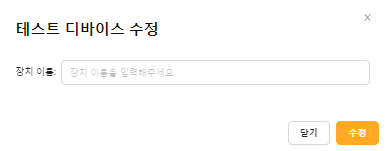
#### **⑤ 테스트 디바이스로 등록**

<div align="left"><figure><img src="/files/OV7vupt7tnFFvk3FRqnX" alt="" width="375"><figcaption></figcaption></figure></div>

#### ⑥ User Properties

* 업로드/연동된 유저의 전체 정보를 확인할 수 있으며, 데이터 수정 또는 삭제할 수 있습니다.

{% hint style="warning" %} <mark style="color:red;">수정 또는 삭제 후 변경사항을 되돌릴 수 없으니 주의하여 사용하시기 바랍니다.</mark>
{% endhint %}

<div align="left"><figure><img src="/files/yVAiWmwW25JOQevid3TW" alt="" width="346"><figcaption></figcaption></figure></div>

#### ⑦ Activities

* 최근 7일간 유저의 앱 내 활동 이벤트 확인이 가능합니다.


---

# Agent Instructions: Querying This Documentation

If you need additional information that is not directly available in this page, you can query the documentation dynamically by asking a question.

Perform an HTTP GET request on the current page URL with the `ask` query parameter:

```
GET https://document.wisetracker.co.kr/audience/user-management/user-list/detail.md?ask=<question>
```

The question should be specific, self-contained, and written in natural language.
The response will contain a direct answer to the question and relevant excerpts and sources from the documentation.

Use this mechanism when the answer is not explicitly present in the current page, you need clarification or additional context, or you want to retrieve related documentation sections.